
The short answer
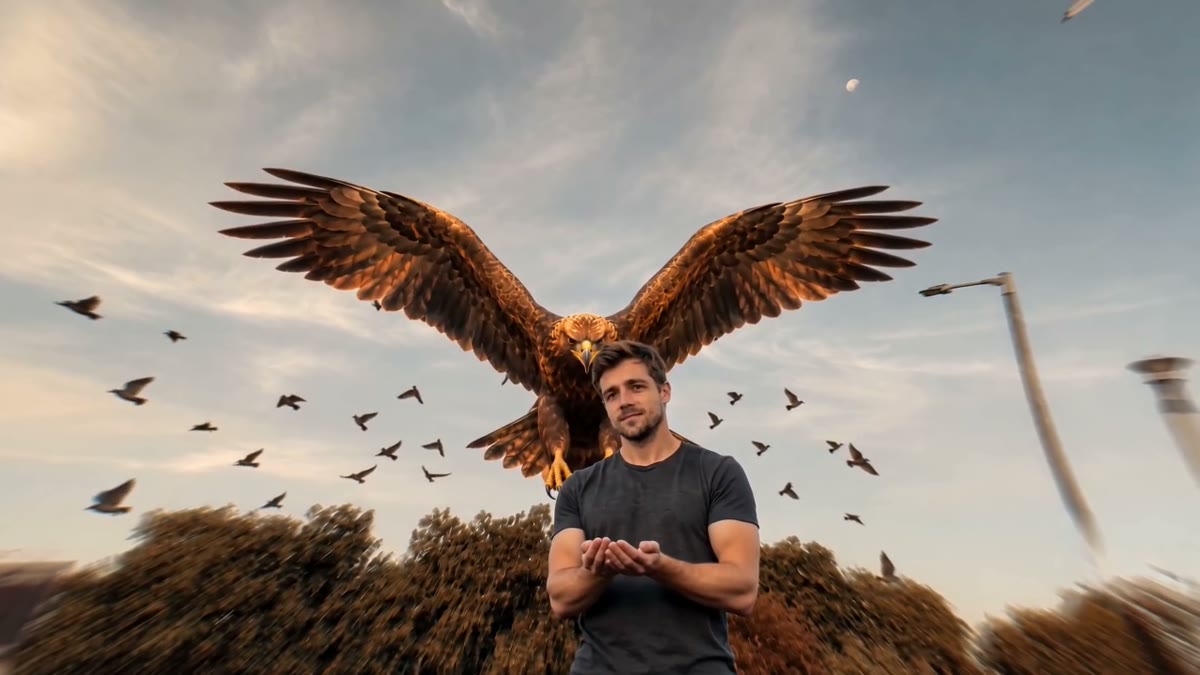
A Jatayu video is a single-shot eagle reveal. The person cups their hands and looks down against a dusk sky, with bronze shrubs and a leaning streetlight in the background. They turn to the side as a giant golden-brown eagle rises behind them about two and a half seconds in.
Start with one photo. BeatRole uses it for your face, hair and visible outfit, then generates the full shot and adds the template soundtrack. The preset supplies the scene and motion.
A close look at the eagle reveal
The camera looks slightly up from waist level. The open sky above the shoulder leaves room for the wings to rise into view. A small moon, warm light and dark shrubs give the reveal a clear silhouette. Landscape makes it easier to see both wingtips, while vertical framing keeps the face and eagle closer to the center.
BeatRole already applies the Jatayu video prompt. To try the effect in another reference-to-video tool, attach a portrait and use this prompt as a starting point.
Create a photorealistic seven-second single shot at dusk. Use my portrait for the person’s face, hair and outfit. Frame them waist-up in front of bronze shrubs under an open evening sky, with a streetlight to the right. They cup their hands, palms up, look down, then turn slightly to the left. At about 2.5 seconds, a giant golden-brown eagle rises behind their shoulder, spreads both wings and scatters a few distant birds. The eagle stays behind the person and raises its wings into a V near the end. Keep the same person, lighting and camera angle throughout.
How to make your Jatayu video
- Upload one portrait. Choose a photo with a clear face, visible hair and shoulders, and one person in the frame.
- Choose the output settings. Select Fast or Pro, pick a resolution and choose landscape, square or vertical. Review the credit quote. The duration stays at 7 seconds in every format.
- Create and review your clip. Sign in and follow the saved task as it goes through review and generation. Watch the person’s turn, the wing reveal and the sound together. Download the approved MP4 from your video history.
What you get
- A dusk opening. The person stands waist-up under an open sky with their palms cupped and their gaze lowered.
- A turn before the reveal. The person looks toward frame left while keeping their hands together. The pause leaves the sky clear before the first wing enters.
- The eagle behind the subject. At about 2.5 seconds the eagle rises past the shoulder, beats its wings and scatters small birds. It stays behind the person and ends with its wings raised into a V.
- The same soundtrack. The template pairs the shot with fixed audio from the beginning. Unmute the sample to hear how it builds into the reveal.
- A new render from your portrait. The framing and broad action follow the template. Details such as fingers, clouds and wing positions can vary from one generation to the next.
Photo tips for the Jatayu effect
- Pick a front-facing photo or a slight angle with both eyes visible. A face in shadow is harder to reproduce during the turn.
- Keep the hair and shoulders in frame so the model has a reference for the silhouette and outfit.
- Prefer even light, a clear expression and a simple background. Glasses are fine when the eyes are visible, and glare or a face covering can obscure features.
- Use a portrait you have permission to use. Choose a JPEG, PNG or WebP file up to 4 MB.
Try another BeatRole effect
For a different one-portrait performance, try the Burning Bridges studio. To bring in two people, use Zombie Couple Video for a kitchen encounter that turns into an embrace and a warm memory.